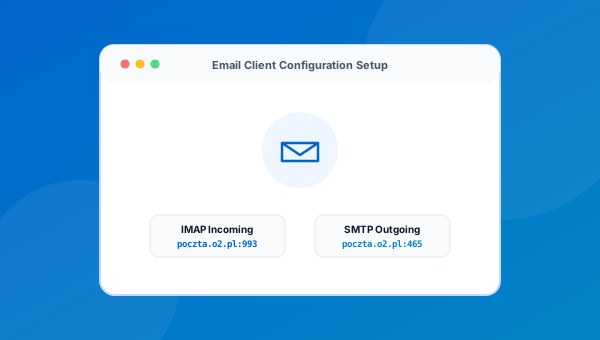
Hello world!
Welcome to WordPress. This is your first post. Edit or delete it, then start writing!
Get immediate access to your verified official Poczta o2 inbox, configure Outlook, Thunderbird, or mobile mail clients with IMAP/SMTP parameters, and diagnose connection errors.
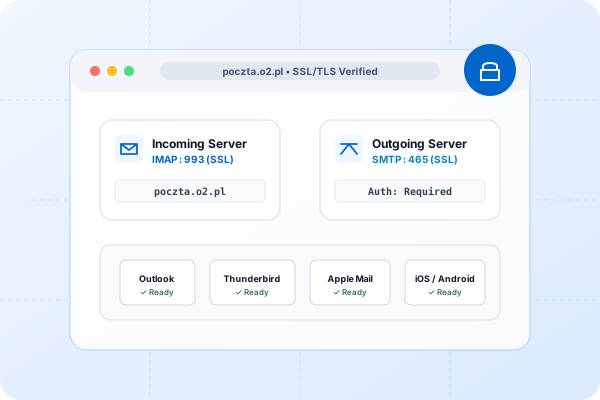
Select your desired action below to access official tools or step-by-step guides.
Direct link to verified login portal at poczta.o2.pl.
Register a fresh @o2.pl or @tlen.pl email address.
Reset your password via SMS or verified backup email.
Setup Outlook, Thunderbird, Apple Mail, and phone apps.
Step-by-step diagnostic tree for sending & receiving errors.
Direct links to verified Google Play and iOS App Store apps.
Switch between IMAP and POP3, pick your preferred mail software, and copy verified server parameters.
Generate exact incoming and outgoing mail server configurations for your desktop or mobile email application. Copy individual values or export your complete setup summary instantly.
By default, external email client access might be disabled on your o2 account. Before adding your account to an application, log into webmail at poczta.o2.pl, navigate to Settings (Ustawienia) → Mail Clients (Programy pocztowe), and activate IMAP/POP3 access. If you use 2-Step Verification (1login WP), you must generate a dedicated Application Password (hasło do aplikacji).
poczta.o2.pl
993
SSL/TLS
poczta.o2.pl
465
SSL/TLS
Required
Step-by-step diagnostic tree addressing webmail loops, SMTP sending failures, and authentication errors.
Diagnose login failures, SMTP sending issues, mail client connection errors, and password recovery blocks through our guided, rule-based decision tree.
Verified port numbers, hostnames, and encryption standards for manual setup.
Verified server addresses, ports, and security protocols for configuring any third-party mail client.
| Protocol | Server Hostname | Port | Encryption | Authentication | Action |
|---|---|---|---|---|---|
|
IMAP Incoming (Sync) |
poczta.o2.pl |
993 |
SSL/TLS | Full Email Address & Password | |
|
POP3 Incoming (Download) |
poczta.o2.pl |
995 |
SSL/TLS | Full Email Address & Password | |
|
SMTP Outgoing (Send) |
poczta.o2.pl |
465 |
SSL/TLS | Required |
Choose your email client, domain alias, and 2FA setting to generate tailored connection parameters with instant clipboard copy and file export.
Select your mail app, domain, and 2FA status to generate tailored connection parameters, port rules, and copyable credentials.
Because Two-Step Verification is active on your 1login WP profile, mail clients CANNOT use your master password. You must generate an App Password in: 1login.wp.pl → Bezpieczeństwo → Hasła do aplikacji zewnętrznych.
| Setting Parameter | Exact Value | Port / Protocol | Action |
|---|---|---|---|
| Incoming Mail Server | poczta.o2.pl |
Port 993 (SSL/TLS) | |
| Outgoing SMTP Server | poczta.o2.pl |
Port 465 (SSL/TLS) | |
| Username Format | [email protected] |
Full email address required | |
| Password Type | Application Password (16 chars) | Generated in 1login WP | Generate → |
| SMTP Authentication | Mandatory (Enabled) |
Use same login credentials as incoming | ✓ Required |
Detailed technical feature comparison between o2 Poczta and major Polish and global email service providers.
| Feature / Parameter | o2 Poczta (Poland) | WP Poczta (Poland) | Google Gmail | Interia Poczta |
|---|---|---|---|---|
| Mailbox Storage Quota | Unlimited (Standard) | Unlimited (Standard) | 15 GB (Shared Drive) | Unlimited |
| Max Attachment (Webmail) | 100 MB | 100 MB | 25 MB (Google Drive for >25MB) | 100 MB |
| Max Attachment (SMTP Client) | 25 MB (MIME Encoded) | 25 MB | 25 MB | 25 MB |
| IMAP / POP3 / SMTP Access | Free (Requires Webmail Toggle) | Free (Requires Webmail Toggle) | Free (OAuth2 / App Passwords) | Free (With Webmail Toggle) |
| Two-Step Verification (2FA) | 1login od WP (SMS / App Push) | 1login od WP (SMS / App Push) | Google Authenticator / Security Key | SMS / Authenticator |
| Ad-Free Premium Option | Poczta o2 Bez Reklam (Paid) | Poczta WP Pro (Paid) | Google Workspace (Monthly) | Poczta Bez Reklam (Paid) |
| Data Jurisdiction & Privacy | Poland / EU GDPR (Strict) | Poland / EU GDPR (Strict) | United States / Global Cloud | Poland / EU GDPR (Strict) |
Understanding the server infrastructure, domain aliases, single sign-on mechanics, and security controls behind o2.pl.
o2 (originally launched in 1999 as Tlen.pl) is owned and operated by Wirtualna Polska Media S.A., one of Poland's largest media technology conglomerates. Server infrastructure is hosted across ISO 27001-certified data center facilities in Warsaw and Gdańsk, ensuring full EU GDPR compliance and data sovereignty.
Authentication across o2.pl, wp.pl, and associated portals is managed by 1login od WP. This unified identity gateway protects accounts against credential stuffing by implementing intelligent behavioral risk analysis, CAPTCHA challenges, and SMS or mobile push two-step verification.
Outbound emails from o2 servers are signed with 2048-bit DKIM keys and validated against strict SPF policies (include:_spf.o2.pl). Inbound MX gateways (mx.o2.pl) enforce real-time blacklists (RBL), Greylisting, and heuristic spam filters to protect mailboxes from malicious phishing campaigns.
Practical walkthroughs for email security, 2FA, mobile applications, and mail recovery.
Welcome to WordPress. This is your first post. Edit or delete it, then start writing!
Clear answers to the most common questions regarding o2 email access, settings, and security.
To open your genuine inbox securely, navigate directly to poczta.o2.pl. Authentication is managed by the unified 1login WP platform. Never enter your credentials on third-party websites or unverified mirrors.
You can register a new account on the official portal at profil.o2.pl/rejestracja. Registration allows choosing domain extensions such as @o2.pl or @tlen.pl and setting up recovery phone numbers for future security.
If you cannot remember your password, visit the verified recovery page at pomoc.o2.pl/nie-pamietam-hasla. You can receive an instant SMS verification code on your linked phone or a reset link on your alternate backup email.
Incoming server: poczta.o2.pl, Port: 993, Security: SSL/TLS. Your username is your full email address (e.g. [email protected]). IMAP ensures all folders and read statuses sync seamlessly across your devices.
Outgoing server: poczta.o2.pl, Port: 465, Security: SSL/TLS. Crucially, "Outgoing server requires authentication" must be checked using your full email credentials.
This typically occurs for two reasons: (1) POP3/IMAP access is turned off by default in your o2 webmail settings, or (2) You have 2-Step Verification active, which requires generating a dedicated Application Password (hasło do aplikacji) in 1login WP.
Because traditional email applications like Outlook or Thunderbird cannot prompt for 2FA SMS verification codes, you generate a secure, 16-character application password inside your 1login WP profile settings to use exclusively for that device.
Official apps are published by Wirtualna Polska Media S.A. directly on the Google Play Store (Android) and Apple App Store (iOS). Never install unofficial APK files from unverified third-party websites.
We recommend enabling 2-Step Verification (dwuetapowa weryfikacja), using a unique strong password stored in a password manager, verifying your phone number in 1login WP, and checking active device sessions regularly.